Acknowledging Messages Received by Clients
The Solace C API provides acknowledgments to the Solace event broker for the guaranteed messages that clients receive through a flow. The figure below shows the process of how the guaranteed messages that an application receives through a flow are acknowledged. During this flow, client applications can also send a negative acknowledgment (NACK) for malformed messages or messages that could not be processed.
Acknowledging Received Guaranteed Messages
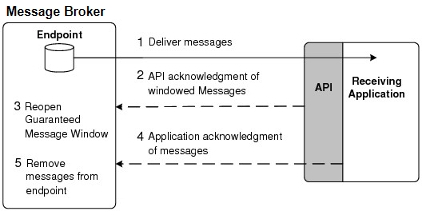
Solace C API Acknowledgments
A Guaranteed message window size limits the number of messages that the API can receive before it must return an acknowledgment to the event broker to indicate that it received the messages in the window. After the API sends this acknowledgment, the Guaranteed message window reopens so that further messages can be sent to the API.
An application can adjust the windowed acknowledgments by changing the default acknowledgment timer and threshold parameters set through the flow properties. For more information, see Important Flow Properties). Changing these defaults is not usually required and will change the performance characteristics of a flow.
Application Acknowledgments
One of the two following application acknowledgment modes can be used for acknowledging a message:
- Auto-acknowledgment
- Client acknowledgment
The acknowledgment mode to use is set through the flow property SOLCLIENT_FLOW_PROP_ACKMODE. By default, the auto-acknowledgment mode is used. The possible values are:
SOLCLIENT_FLOW_PROP_ACKMODE_CLIENTSOLCLIENT_FLOW_PROP_ACKMODE_AUTO(Default)
Auto-Acknowledgment Mode
When the auto-acknowledgment mode is used, the Solace C API automatically generates application-level acknowledgments.
Client Acknowledgment Mode
When the client acknowledgment mode is used the client must explicitly send an acknowledgment for the message ID of each message received. Optionally, you can use negative acknowledgments as well. For more information, see Negative Acknowledgments for Specific Messages.
To explicitly send a client acknowledgment, call solClient_flow_sendAck(...).
Avoid allowing the number of outstanding unacknowledged messages to become excessively large (for example, 10,000 or more) because the egress message rate from the event broker can start to decline.
When using the client acknowledgment mode with the Solace C API, the maximum number of messages that the API can deliver to the application through the flow without receiving client acknowledgments can be set through the SOLCLIENT_FLOW_PROP_MAX_UNACKED_MESSAGES flow property. By default, this property has a value of -1, which specifies that the maximum number of unacknowledged messages that can be delivered is not restricted by the API. (To change the maximum number of unacknowledged messages that may be received through an existing flow, call solClient_flow_setMaxUnacked()).
Negative Acknowledgments for Specific Messages
You can use negative acknowledgments (NACKs) if you have configured your applications for client acknowledgments (see Client Acknowledgment Mode). When you use NACKs, you can send a settlement outcome to let the event broker know the result from processing a guaranteed message that was received. Based on the settlement outcome, the event broker knows how to handle the message on its queue. You can use the following settlement outcomes:
- ACCEPTED—This ACK notifies the event broker that your client application successfully processed the guaranteed message. When the event broker receives this outcome it removes the message from its queue.
- When you call a settlement function with an outcome of ACCEPTED, it is the same as calling an ACK function in Client Acknowledgment Mode.
- FAILED—This NACK notifies the event broker that your client application did not process the message. When the event broker receives this NACK it attempts to redeliver the message while adhering to delivery count limits.
- REJECTED—This NACK notifies the event broker that your client application could process the message but it was not accepted (for example, failed validation). When the event broker receives this NACK it removes the message from its queue and then moves the message to the dead message queue (DMQ) if it is configured.
Before you can use NACKs, you must add the FAILED, REJECTED, or both outcomes as NACK types when you create the flow to prepare the flow to work with negative acknowledgments. You do not need to add the ACCEPTED outcome because it is always available. If you try to use an outcome that has not been added, you get an error of Required Settlement Outcome Not Supported.
- NACKs can be lost during transit (for example due to unexpected networking issues). Consider this fact as part of the logic for handling messages when you develop your application.
- NACKs are supported on event brokers 10.2.1 and later. If an event broker does not support NACKs, an
InvalidOperationExceptionoccurs during the flow bind request when an outcome is specified.
Enable and prepare the flow to use negative acknowledgments:
SOLCLIENT_FLOW_PROP_REQUIRED_OUTCOME_FAILEDSOLCLIENT_FLOW_PROP_REQUIRED_OUTCOME_REJECTED- To enable a NACK, set the property to
SOLCLIENT_PROP_ENABLE_VAL
To acknowledge a message, you can send an ACK or NACK using:
solClient_flow_settleMsg(solClient_opaqueFlow_pt, solClient_msgId_t, solClient_msgOutcome_t)
For solClient_msgOutcome_t, you can use the following enumerated values:
SOLCLIENT_OUTCOME_ACCEPTEDSOLCLIENT_OUTCOME_FAILEDSOLCLIENT_OUTCOME_REJECTED
Using NACKs with the Solace C API
For the Solace C API to use NACKs you must set SOLCLIENT_FLOW_PROP_REQUIRED_OUTCOME_FAILED, SOLCLIENT_FLOW_PROP_REQUIRED_OUTCOME_REJECTED, or both properties to SOLCLIENT_PROP_ENABLE_VAL.
The following sample code shows how to send NACKs using a fictional processMessage() function to process the guaranteed message, which provides a status of processing so that you can send the settlement outcome using the solClient_flow_settleMsg() function:
/* This code snippet presumes that you have a
   session and endpoint (queue)already */
/* Message count for messages that were accepted by the client */
static int msgCount = 0;
static int msgCountSuccess = 0;
static int msgCountFailed = 0;
static int msgCountRejected = 0;

/* Callback to handle messages */

static solClient_rxMsgCallback_returnCode_t flowMessageReceiveCallback ( solClient_opaqueFlow_pt flow_p,
                                                                         solClient_opaqueMsg_pt msg_p,
                                                                         void *user_p )
{
  solClient_msgId_t msgId;
  int status=0;
  /* Process the message. */
  printf ( "Received message:\n" );
  //Some function to process the message and return a status
  status = processMessage(msg_p);
  solClient_msg_getMsgId (msg_p, &msgId);
  msgCount ++

 /* If the status was good)
 if ( status  == 0 ) {
    printf ( "Message passed validation\n");
    solClient_flow_settleMsg(flow_p, msgId, SOLCLIENT_OUTCOME_ACCEPTED);
       msgCountSuccess++;
 }
 else if (status ==  1 ) {
    printf ( "Message failed validation\n");
    solClient_flow_settleMsg(flow_p, msgId, SOLCLIENT_OUTCOME_REJECTED);
       msgCountRejected++;
 }
 else {
    printf ( "Message failed to process message.\n");
    solClient_flow_settleMsg(flow_p, msgId, SOLCLIENT_OUTCOME_FAILED);
    msgCountFailed++;
 }
}
...
...

int main (in argc, char *argv[])
{
   /* The code snippet presumes a session has been created */
   /* Configure the flow function information */
   flowFuncInfo.rxMsgInfo.callback_p = flowMessageReceiveCallback;
   flowFuncInfo.eventInfo.callback_p = flowEventCallback;

   if (!solClient_session_isCapable(session_p, SOLCLIENT_SESSION_CAPABILITY_AD_APP_ACK_FAILED)) {
      exit(1);
    }
    /* We must add both these properties if want use FAIL and REJECT as outcomes
       which prepares the flow to use negative acknowledgment. */
    props[propIndex++] = SOLCLIENT_FLOW_PROP_ACKMODE;
    props[propIndex++] = SOLCLIENT_FLOW_PROP_ACKMODE_CLIENT;
    props[propIndex++] = SOLCLIENT_FLOW_PROP_REQUIRED_OUTCOME_FAILED;
    props[propIndex++] = SOLCLIENT_PROP_ENABLE_VAL;
    props[propIndex++] = SOLCLIENT_FLOW_PROP_REQUIRED_OUTCOME_REJECTED;
    props[propIndex++] = SOLCLIENT_PROP_ENABLE_VAL;
    props[propIndex++] = NULL;

    ...
    ...
     solClientRc = solClient_session_createFlow(props,
                                                session_p,
                                     &flow_p,
                                     &flowFuncInfo,
                                     sizeof(flowFuncInfo));


  /** Wait for messages **/
  printf ( "Waiting for messages......\n" );
  fflush ( stdout );
  while ( msgCount < 1 ) {
     SLEEP ( 1 );
  }
...
...
}