Building a Custom Plug-In Shared Library
To build a custom Ingress Message Plug-In shared library, Solace recommends that you use the makefile found in the ex directory where you extracted the Solace Cache package. This makefile allows you to remove the default Plug-In library (libSolCachPlugin.so) and make a Plug-In library based on the modifyCachePlugin.cpp or opcodePluginSample.cpp samples.
To activate a new Plug-In library, the Solace Cache Instance must first be stopped. The library libSolCachePlugin.so can then be replaced and the Solace Cache Instance be restarted.
Design Considerations
The following sections provide important functional information regarding the Ingress Message Plug-In. This information must be taken into consideration when designing a custom Plug-In.
- Ingress Events
- Shared Library Description
- Plug-In Function
- Synchronization
- Memory Management Guidelines
Ingress Events
The Solace Cache Instance uses the solCache_event_t enumeration to indicate to the Plug-In function why it is being called. There are two possibilities:
SOLCACHE_INGRESS_EVENT_INITThis event initializes/registers the Plug-In.
SOLCACHE_INGRESS_EVENT_DATA_MSGThis event indicates that an ingress live data message is received. This event occurs for every received message.
The solCache_pluginFuncs discussed below must handle these events appropriately.
SOLCACHE_INGRESS_EVENT_INIT
The SOLCACHE_INGRESS_EVENT_INIT event is generated once, at startup, before any other Solace Cache operations. When a SOLCACHE_INGRESS_EVENT_INIT is received, it may initialize the Plug-In, it also provides a mechanism for the Plug-In to detect Solace Cache Instance capabilities and report the Plug-In capabilities to the Solace Cache Instance.
If the Plug-In does not successfully initialize (that is, it returns a SOLCACHE_INGRESS_EVENT_OP_FAIL opcode to the Solace Cache Instance), the Solace Cache Instance enters a Stop state. In this case, admin “start” or “clear-event” commands cannot be used to clear this state. To run the Solace Cache Instance, you must either modify your Plug-In so that it does not return a SOLCACHE_INGRESS_EVENT_OP_FAIL opcode or disable the Plug-In and run the Solace Cache Instance without it.
After the Plug-In is initialized, it can begin to receive SOLCACHE_INGRESS_EVENT_DATA_MSG events, and it may callback into the Solace Cache Instance using the callback functions provided by the Solace Cache Instance.
The SOLCACHE_INGRESS_EVENT_INIT event uses a passed‑in solCache_initEventInfo_t structure. This structure includes two sets of function pointers:
solCache_pluginFuncs—Pointers to callback functions that the Solace Cache Instance calls for generated events. These are:SOLCACHE_INGRESS_EVENT_DATA_MSG (0)—default void solCache_plugin(solCache_pluginEventInfo_t *eventInfo_p). An event callback for received data messages.SOLCACHE_INGRESS_EVENT_INIT (1)—default void solCache_plugin(solCache_pluginEventInfo_t *eventInfo_p). This event signals to the Plug-In the available event and utility functions. It only occurs once, and, consequently, the event callback may not be changed. The Plug-In must implement the functionsolCache_plugin(), and that function is always called with this event by any Solace Cache Instance that supportsSOLCACHE_INGRESS_EVENT_INIT.
solCache_utilityFuncs—The Solace Cache Instance provides asolCache_msg_getNextCachedMsg()utility function, which allows the Plug-In to query the Solace Cache Instance to retrieve already-cached messages. For more information, see Get Next Utility.A Solace Cache callback function must be called through the pointers provided in the
SOLCACHE_INGRESS_EVENT_INIT. It is not resolvable by the run-time or compile-time linker, and it cannot be called directly by Plug-In applications.
SOLCACHE_INGRESS_EVENT_DATA_MSG
When the Plug-In receives a SOLCACHE_INGRESS_EVENT_DATA_MSG, it can perform a number of processing actions. However, before developing a customized Plug‑In to handle ingress live data messages, you should read Memory Management Guidelines, then develop your Plug-In accordingly.
- When the Plug-In receives a
SOLCACHE_INGRESS_EVENT_DATA_MSG, it may: - Examine or copy the received message.
- Modify the contents of the received message. If the contents are modified, the Solace Cache Instance caches the modified message on return from the Plug-In (if the returned operation code specifies to cache the message and it can be cached).
If the Plug-In changes the received message’s topic, it is cached under the new topic. If the Plug-In changes the received message’s topic and returns
SOLCACHE_INGRESS_OP_FLUSH_AND_CACHEorSOLCACHE_INGRESS_OP_FLUSH_AND_DISCARD, then all entries in the cache for the new topic are flushed. - Replace the
msg_pvalue in theeventInfowith a wholly newly allocatedsolClient_opaqueMsg_pt. The new message is then cached instead of the received message, and it must contain sufficient information to be encoded as valid message (that is, it should at least contain a topic and a binary attachment). This message is cached under the topic found in the new message. When the Plug-In chooses this option, the newmsg_pand the originalmsg_pare owned by the Solace Cache Instance. Neither reference should be released bysolClient_msg_free(), and neither reference may be used after the Plug-In returns.
Shared Library Description
The shared library must implement the solCache_getPluginDescription() function so that the Solace Cache Instance can retrieve a description string for the Plug-In library.
The function should return a pointer to a null-terminated string that provides the Solace Cache Instance with name and version of the Plug-In (for example, Customer X Plugin vX.X). The Solace Cache Instance assumes that the pointer that is returned is valid.
This function is called many times during the lifetime of the process. Therefore, the Plug-In must ensure that the returned pointer is either a pointer to static memory, or, if it is a pointer to heap memory, that it is allocated at most once. The pointer must never reference stack memory.
You can use the show cache-instance <instance-name> remote status User EXEC command on the Designated Router to view the Plug-In description of a Solace Cache Instance. See Show Cache Instance.
Plug-In Function
Whenever a Solace Cache Instance using an active Ingress Message Plug-In receives a live data message, it passes a solCache_pluginEventInfo_t data structure to the shared library just before it would typically write that received message to the cache. This invokes the Plug-In function (solCache_plugin(solCache_pluginEventInfo_t *, unless changed during the init).
The Plug-In function is only invoked when live data messages are received; it is not invoked for resynchronization operations between Solace Cache Instances.
The Plug-In function examines the referenced message contents and then returns an operation code in the solCache_pluginEventInfo_t data structure to the Solace Cache Instance that instructs it as to what action to take.
The Plug-In function is invoked from the context of a receive message handler of the Solace C API; therefore, the Plug-In function can use any Solace Messaging API for C message parsing/processing functions. For information on the Solace C API functions that are available, see the Solace Messaging API for C reference.
The Plug-In is invoked for every received message before it is stored in a Solace Cache Instance. Therefore, the time a message spends in the Plug-In directly affects the maximum rate which Solace Cache can receive and cache messages. For example, to achieve even a modest message caching rate of 50,000 msg/second the Plug-In must run for less than 20 microseconds (us) per received message.
solCache_pluginEventInfo_t
The solCache_pluginEventInfo_t structure is used to pass the ingress message pointer and event type to the Plug-In function, and it is used to return back to the Solace Cache Instance the message pointer and the operation that the Solace Cache Instance is to perform. Therefore, the ingress message Plug-In function technically does not return any value to the Solace Cache Instance–it encodes its decision in the solCache_pluginEventInfo_t data structure that was passed to it by reference.
The following table lists the solCache_pluginEventInfo_t structure members.
| Item | Description |
|---|---|
|
event |
The event code that indicates to the Plug-In function why it is being called. The possible events include:
For more information, see Ingress Events. |
|
msg_p |
A pointer to the message received by the Solace Cache Instance. The Plug-In function may modify the contents of the message or change the See Memory Management Guidelines for a detailed discussion of the considerations when modifying message contents. |
|
opcode |
The operation code that the Plug-In function returns to the Solace Cache Instance that indicates how to handle the received message. The available opcodes are:
The Solace Cache Instance logs an error and discards the message if the Plug-In function returns an invalid opcode. |
Get Next Utility
The Plug-In can use the solCache_msg_getNextCachedMsg(topic_p) utility function to retrieve a solClient_opaqueMsg_pt to the most recent cached message for a particular topic from the Solace Cache Instance. This allows the Plug-In to update an ingress live data message with information from that cached message, or even allow a copy of the cached message to be modified and then that modified message can be returned to the Solace Cache Instance instead of the ingress live data message received by the Plug-In.
The following figure shows an example of how this utility function could retrieve a cached message, and then use the Plug-In functionality to modify that message with select information copied from an ingress live data message. The Plug-In would then return the update cached message back to the Solace Cache Instance.
Incremental Updates to Cached Messages
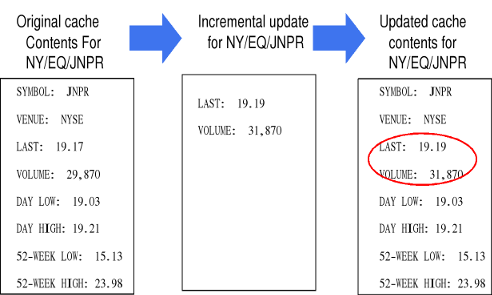
When the Plug-In calls solCache_msg_getNextCachedMsg(topic_p), it must pass in a topic_p, which is a pointer to a topic string to look up.
Wild card topics are not permitted. If a topic contains a wildcard, the lookup will fail, and no message will be returned.
solCache_msg_getNextCachedMsg() returns a solClient_opaqueMsg_pt that references a cached message for the specified topic. The Plug-In ‘owns’ the returned message pointer and must call solClient_msg_free() to release it when it is no longer required. When there are no messages cached on the topic, this function returns NULL.
Although a referenced cached message cannot be directly modified, it is referenced through copy-on-write accessors, which provide a copy that the Plug-In can modify through get and set message functions (see Recommended Message Accessor Functions). Using these message accessor functions, the Plug-In may update an ingress live data message with information from the referenced cached message.
The Plug-In can also modify the referenced cached message and return it, instead of the current ingress live data message, in the solCache_pluginEventInfo_t . This allows the cached message to be modified indirectly.
If the Plug-In replaces the live data message referenced by msg_p, then the message pointer retrieved by solCache_msg_getNextCachedMsg() must not be released because it is still considered ‘in-use’. In no situation should the Plug-In ever release the message pointer for the ingress live data message it is handling, even if the Plug-In overwrites that message pointer with that of the retrieved cached message.
Synchronization
When a Solace Cache Instance synchronizes with another Solace Cache Instance, or fetches data from a home Cache Cluster (when Global Caching is used), it can receive both live data and data from the other Solace Cache Instance at the same time. This means that while synchronizing, a Solace Cache Instance can receive a given message (or the aggregate results of a series of messages) more than once. In such cases, Solace Cache always processes the synchronization messages first, followed by the live data messages for the topic. Synchronization messages are never passed through the Plug-In, they are always inserted directly into the Solace Cache Instance.
When developing a Plug-In that modifies an already-cached message, it is important that the operations to be performed by the Plug-In are limited to those that can be applied to a cached message multiple times without adversely affecting the final message content in the Solace Cache Instance. This typically means only performing the following operations on a cached message:
- add a field to the message if it does not already exist, or replace a field in the message with the new data
- remove a field from the message
- discard the message
- delete the cache contents for the message topic
If a Plug-In needs to perform more complex incremental operations (for example, “add 10 to field y”, “multiply field z by 2”), then the Plug-In might need to insert additional sequencing data into the cached messages (if such sequencing data has not been included in the published messages). The Plug-In must always examine this data before applying an update to determine if an update message is a duplicate that has already been applied to the cached data. This enables the Plug-In to discard an inbound message rather than performing a duplicate operation on the cache contents.
Memory Management Guidelines
When processing a received SOLCACHE_INGRESS_EVENT_DATA_MSG, the message structure referenced by msg_p remains owned by the Solace Cache Instance. That is, while reading contents of the message, the Plug-In directly accesses Solace Cache Instance memory. The application must not use this reference after returning from the Plug-In, and the application must not call solClient_msg_free() to release the reference.
If the msg_p passed to the Plug-In in the solCache_pluginEventInfo_t is used to modify message contents, those changes take effect when solCache_plugin() returns. However, any changes to a message retrieved with solCache_msg_getNextCachedMsg() does not affect the already cached message.
The Plug-In owns any allocated solClient_opaqueMsg_pt. If the Plug-In allocates a message with either solClient_msg_alloc() or solCache_msg_getNextCachedMsg(), the Plug-In must dispose of the memory in one of the following ways:
- call
solClient_msg_free() - set the message pointer in
solCache_pluginEventInfo_tbefore returning fromsolCache_plugin(). In this case, the Plug-In must not callsolClient_msg_free()to release the originalsolClient_opaqueMsg_ptthat was passed insolCache_pluginEventInfo_t.
Failure to manage the allocated solClient_opaqueMsg_pt according to these rules will result in memory leaks.
Recommended Message Accessor Functions
When working with received messages, your customized Plug-In should only use copy-out and copy-in message accessor functions instead of directly referencing cache memory.
By using message accessor functions, any modifications made to the message contents do not affect the message because they are local to the Plug‑In. (They only affect cached memory if the solClient_opaqueMsg_pt is returned to the cache in solCache_pluginEventInfo_t.)
The copy-out message accessor functions are:
solClient_msg_getBinaryAttachment()solClient_msg_getCorrelationTag()solClient_msg_getUserData()solClient_msg_getXml()solClient_msg_getSmf()
The corresponding copy-in message accessor functions are:
solClient_msg_setBinaryAttachment()solClient_msg_setBinaryAttachmentContainer()solClient_msg_setUserData()solClient_msg_setXml()solClient_msg_setCorrelationTag()solClient_msg_setDestination()