Scaling to Several Teams
Use this setup when a second team starts to use the staging and production environments. Each team keeps its resources in its own repository. Administrators keep a platform repository with one manifest for each environment, and each manifest imports the resources of each team at a fixed commit.
Before You Begin
Set up one team first, with a manifest for each environment and a pipeline. For more information, see Promoting Changes Between Environments.
How the Setup Works
The following diagram shows how the resources of each team reach staging and production:
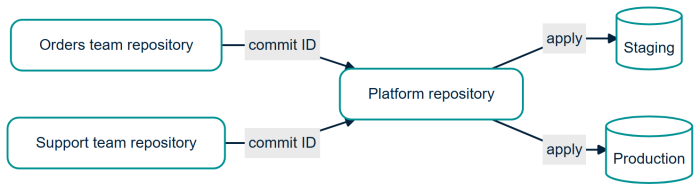
| Repository | Contains | Owner |
|---|---|---|
| Team repository | The agents, workflows, toolsets, and skills of one team, and manifests/local.yaml for the desktop instance. |
The team |
| Platform repository | A manifest for each environment, the models, shared connectors, roles, system users, entrypoints, and the platform block. The pipeline and the API keys. |
Administrators |
Each environment manifest imports the resources of each team with sources:
# staging.yaml
kind: manifest
name: staging
target:
  url: https://staging.agent-mesh.example.com
sources:
  orders: git+ssh://git@git.example.com/agent-mesh/orders.git@3f2b7967c1d0a1b2c3d4e5f60718293a4b5c6d7e  # v1.4.0
  support: git+ssh://git@git.example.com/agent-mesh/support.git@4e220af0b3c4d5e6f708192a3b4c5d6e7f809a1b  # v2.0.1
variables:
  orders_api_base: https://orders.staging.example.com
resources:
  models:
    - general
  toolsets:
    - orders-api@orders
  agents:
    - orders-intake@orders
    - support-triage@support
  workflows:
    - orders-status-lookup@orders
    - support-ticket-triage@support
Use the full commit ID. The sam config command caches a version tag as if the tag never changes, and warns only for a branch or a short commit ID. Do not use --allow-floating-refs. For more information, see Importing Resources From Other Repositories.
The sam config command runs git to fetch each source, without prompting for credentials. Give the pipeline read access to each team repository, for example with an SSH deploy key.
This setup has the following advantages:
-
The environment manifest shows what each environment runs.
-
Only the pipeline of the platform repository applies to staging and production, and only that pipeline holds the API keys.
-
If two teams declare the same name for the same kind of resource,
sam config planstops with an error. -
An imported resource uses the variables of the environment manifest, so administrators review the values for each environment in one place.
An import is not transitive: a team repository's own sources are not followed. Each toolset and skill that an imported agent uses must be in the environment manifest, built in, or already on the deployment.
Rules and Checks
Add checks to the pipeline of the platform repository so that team repositories follow these rules. Teams must not be able to change the checks.
| Rule | The Check Fails When |
|---|---|
Start each resource name with the team name, for example orders-intake. |
An entry such as x@orders does not start with orders-. |
| Teams own agents, workflows, toolsets, and skills only. | An entry such as x@orders is of another kind. |
| Pin each source to the full 40-character commit ID, with the tag in a comment. | A source is a branch, a tag, or a short commit ID, or the tag in the comment does not point to that commit. |
| Get approval to use a sensitive shared resource, such as a connector that writes to a customer system. | A team resource starts to use a sensitive shared resource without approval. |
| Get approval for each new variable or secret that your resources use. | A pull request adds a variable or secret to an environment manifest, and no administrator approved it. |
| Get approval for each new or changed toolset build script. | A change adds or changes a toolset build script without approval. |
Also show the plan to the reviewer, for example by posting the output of sam config plan as a comment on the pull request. The plan output names the source and the commit of each imported resource.
On the machine that runs the plan or the apply, the sam config command builds each imported toolset that has source code. The build script can read the environment of the pipeline, including its API key. Review each build script as you review code before you approve a release.
Release a Change
-
The team merges and tags the change in its repository.
-
The team opens a pull request in the platform repository that changes its commit ID in
staging.yaml. For a new resource, the pull request also adds an entry for the resource. It also adds an entry for each toolset or skill that the resource uses and that is not already on the deployment. -
The pipeline runs
sam config planand the checks, and an administrator approves. -
After the merge, the pipeline applies
staging.yamland runs the evaluations. -
A second pull request copies the commit ID to
prod.yaml. A check makes sure that the pipeline applied this commit to staging. After the merge, an administrator creates a release tag in the platform repository. The tag starts the pipeline that appliesprod.yaml.
If the files of one team have an error, the plan stops for all teams. Revert that pull request. A revert does not delete resources that the reverted change added.
Move From One Team to Several Teams
-
Create a platform repository. Move
manifests/staging.yaml,manifests/prod.yaml, the role and system user files, the shared models, and the pipeline to it. -
In each environment manifest, add a source for the team repository at a full commit ID, and change each team entry to
name@orders. -
Move the staging and production API keys to the pipeline of the platform repository, and remove them from the team repository.
-
Keep
manifests/local.yamland the resource files in the team repository.
Test with the Resources of Other Teams
Each team keeps a manifests/local.yaml file that any other team can apply to its own desktop instance. The variables in the file point to test services instead of production systems, and applying the file requires no secret that only the owning team has.
To test with the resources of another team, check out its repository at its released commit and apply its manifests/local.yaml to your desktop instance. Then apply your own.
Remove Resources
Removing an entry does not delete the resource. After the apply, delete each removed resource yourself, in staging first. Use --prune only when this repository is the only source of changes to the deployment and the manifest lists every resource of its kinds on the deployment, including the built-in agents. For more information, see Remove Resources.
Do not delete or rename a shared model. When you delete a model, Agent Mesh undeploys every agent and workflow that uses it, in all teams. If you add the model again, they stay undeployed.
Let Each Team Apply Its Own Manifest
Each team can also apply its own manifest to staging and production from its own pipeline, without an environment manifest. Use this setup only if each team must release without a review by administrators. In this setup:
-
Each team needs its own API key for each environment.
-
A check that teams cannot change must fail a plan that changes a name without the team prefix.
-
No file shows what an environment runs, so your pipelines must keep a record of each apply.
Agent Mesh does not record which repository owns a resource. If two teams apply a resource with the same name, the last apply wins, without a warning.
What Next?
For a list of all the practices, see Best Practices for Configuration as Code.