Enabling Single Sign-On (SSO)
Authentication is a property of the Web UI Entrypoint, not of the agents: the Entrypoint identifies who the user is. It performs OpenID Connect (OIDC) login in-process: it redirects the browser to your identity provider (IdP), consumes the authorization-code callback, and issues its own session token. Solace Agent Mesh uses no separate authentication proxy.
What an authenticated user can then do is a separate concern, configured using role-based access control (RBAC). For more information, see the RBAC Reference.
In the following sections, we show you how to register each IdP, set the required redirect URI, and configure your Agent Mesh deployment. For detailed information, see Authentication and Helm Values Reference.
How the Login Flow Works
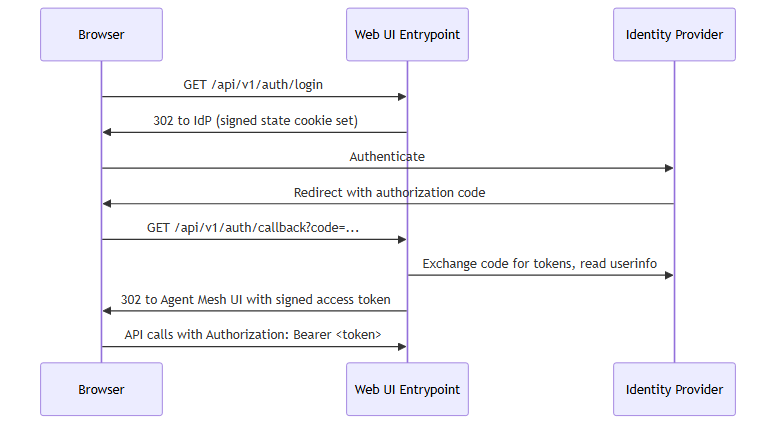
The Entrypoint validates the state cookie on callback, exchanges the code, reads the email claim to identify the user (falling back to sub when the IdP does not return an email), and issues its own signed access token, a JSON Web Token (JWT) signed with ES256. The browser stores that token and sends it as a bearer token on every subsequent API call. Confirm a resolved identity any time by calling GET /api/v1/user.
When the Agent Mesh UI Is Embedded in a Frame
Identity providers block their sign-in pages from loading inside a frame (an HTML iframe). Microsoft Entra ID, for example, sends X-Frame-Options: DENY. When the Agent Mesh UI runs inside a frame on another site, login therefore never happens in the frame itself:
-
In a Microsoft Teams tab, login opens in the Teams sign-in window, and Teams returns the session to the tab.
-
In any other frame, login opens in a pop-up window, which passes the session back to the frame and closes.
Browsers open a pop-up only in response to a user action, so when a session expires inside a frame, the Agent Mesh UI shows a Sign in button instead of redirecting on its own. You don't change the IdP registration or callback URI for embedded use.
Before You Begin
Register one OIDC application (a confidential client) with your IdP. Regardless of the provider console's terminology, you need:
-
Authorization-code flow enabled, with client authentication on (you receive a client secret).
-
Redirect (callback) URI set to the callback path
/api/v1/auth/callbackon the host users reach:-
Production:
https://<your-dns-name>/api/v1/auth/callback -
Local development:
http://localhost:8800/api/v1/auth/callback
The URI must match exactly, path included; otherwise the redirect fails.
-
-
Scopes
openid,email, andprofile. Addoffline_accessif you want refresh tokens. -
The
emailclaim available in theuserinforesponse. The Entrypoint reads it to identify the user, falling back to thesubclaim when no email is present.
If you plan to map RBAC roles from IdP groups, also configure a group or role claim (commonly groups) on the client. See Turn on RBAC After Login.
Two Ways to Configure
You express the same OIDC settings at one of two layers, depending on how you deploy:
-
Kubernetes with the Helm chart: set the camelCase
sam.oauthProvider.oidcvalues (issuer,clientId,clientSecret). The chart injects them as theOIDC_ISSUER,OIDC_CLIENT_ID, andOIDC_CLIENT_SECRETenvironment variables, which the bundled provider catalog reads. Most production rollouts use this path. -
Direct runtime config: for local runs or non-Helm deployments, declare both the snake_case
providers:catalog and the Entrypointapp_configkeys yourself.
Both resolve to the same runtime provider catalog. The rest of this page shows both forms where they differ.
The Provider Catalog
Configure OIDC through a top-level providers: block: a map of named entries, one per IdP. The Entrypoint selects one entry via external_auth_provider (or, on Helm, sam.oauthProvider.providerName).
# oidc_providers.yaml - pulled into the entrypoint config with !include
providers:
  azure:
    issuer: "${OIDC_ISSUER}"
    client_id: "${OIDC_CLIENT_ID}"
    client_secret: "${OIDC_CLIENT_SECRET}"
    scopes: ["openid", "email", "profile", "offline_access"]
    # Pin a CA bundle for a self-signed or private-CA IdP:
    # ca_cert_path: "/etc/pki/custom-ca.pem"
    # DEV ONLY - disables TLS validation, exposes tokens to MITM:
    # insecure_skip_verify: true
    # DEV ONLY - drops the Secure flag on the state cookie so login works
    # over plain http://localhost. Leave unset in production.
    # dev_mode: true
Selection rules:
-
If the catalog has exactly one entry, leaving
external_auth_providerunset auto-selects it. -
A catalog with more than one entry requires an explicit
external_auth_providerthat matches a key; a mismatch is a hard startup error listing the available names.
The redirect_uri field is optional. When external_auth_callback_uri is set (as in the following app_config example), it takes precedence over a catalog redirect_uri. The effective order is external_auth_callback_uri, then the catalog redirect_uri, then a value derived from frontend_server_url.
In the Entrypoint app_config, point at a catalog entry and supply a signing key:
# Web UI entrypoint runtime config
session_secret_key: "${SESSION_SECRET_KEY}"
frontend_use_authorization: ${FRONTEND_USE_AUTHORIZATION, false}
frontend_redirect_url: ${FRONTEND_REDIRECT_URL}
external_auth_callback_uri: ${EXTERNAL_AUTH_CALLBACK, http://localhost:8800/api/v1/auth/callback}
external_auth_provider: ${EXTERNAL_AUTH_PROVIDER, azure}
authorization_service:
  type: ${AUTHORIZATION_TYPE, none}
The session_secret_key signs the state and access-token cookies and is required when OIDC is enabled. Generate a real random value. Never use a placeholder:
openssl rand -hex 32
Setting authorization_service.type: none grants every authenticated user full access. Use it only to validate the login handshake, then restrict access with RBAC before production.
Register Your Identity Provider
The following examples assume a deployed host your-dns-name; substitute your own, and use localhost:8800 for local development. The Microsoft Entra ID walkthrough is fully worked; the other providers follow the same pattern with provider-specific issuer URLs and console locations.
Identity-provider consoles change over time. The Microsoft Entra ID steps match the configuration tested with Agent Mesh; treat the other providers' console navigation as a guide and confirm against your provider's current documentation.
Microsoft Entra ID
-
In the Microsoft Entra admin center, register a new application under App registrations > New registration.
-
Add a Web redirect URI:
https://<your-dns-name>/api/v1/auth/callback. -
Under Certificates & secrets, create a client secret and record its value.
-
Note the Application (client) ID and your Directory (tenant) ID. The issuer is
https://login.microsoftonline.com/<your-tenant-id>/v2.0. -
To map roles from group membership, add the
groupsclaim under Token configuration. Microsoft Entra ID deliversgroupsin the ID token rather than theuserinforesponse.
On Kubernetes, set the Helm values:
# Agent Mesh Helm values
sam:
  authorization:
    enabled: true
  oauthProvider:
    oidc:
      issuer: "https://login.microsoftonline.com/<your-tenant-id>/v2.0"
      clientId: "<your-client-id>"
      clientSecret: "${OIDC_CLIENT_SECRET}"
Supply ${OIDC_CLIENT_SECRET} from a Kubernetes Secret via extraSecretEnvironmentVars rather than writing it inline. The equivalent runtime-config form is the azure catalog entry shown in The Provider Catalog.
-
In the Google Cloud Console, under APIs & Services > Credentials, select Create credentials > OAuth client ID and the Web application type.
-
Under Authorized redirect URIs, add
https://<your-dns-name>/api/v1/auth/callback. -
Create the client. The console shows the client ID and client secret; record both.
-
Note the issuer:
https://accounts.google.com. -
To map roles from groups, use a Google Workspace or Cloud Identity directory and configure the group claims it requires; Google does not emit group membership by default.
Okta
-
In the Okta Admin Console, under Applications, select Create App Integration, then OIDC - OpenID Connect and the Web Application type.
-
Under Sign-in redirect URIs, add
https://<your-dns-name>/api/v1/auth/callback. -
Save the application, then copy the client ID and client secret from its General tab.
-
Note the issuer:
https://<your-org>.okta.com. -
To map roles from groups, add a
groupsclaim to the ID token (or theuserinforesponse) with a groups claim filter on the authorization server.
Auth0
-
In the Auth0 Dashboard, go to Applications, select Create Application, then choose the Regular Web Application type.
-
Under Allowed Callback URLs, add
https://<your-dns-name>/api/v1/auth/callback. -
Copy the client ID and client secret from the application's Settings tab.
-
Note the issuer:
https://<your-tenant>.auth0.com/(including the trailing slash), or your custom domain. -
To map roles from groups, add group membership through an Auth0 Action or the Authorization extension. Custom claims must use a namespaced claim URI.
Keycloak
-
In your realm, go to Clients, select Create client, then set the client type to OpenID Connect.
-
Enable Standard flow and Client authentication (a confidential client).
-
Under Valid redirect URIs, add
https://<your-dns-name>/api/v1/auth/callback. -
Copy the client secret from the client's Credentials tab, and note the issuer:
https://<your-host>/realms/<your-realm>. -
To map roles from groups, add a Group Membership mapper that includes a
groupsclaim.
If your Keycloak instance (or any IdP) uses a self-signed or private certificate authority (CA) certificate, pin its CA bundle with ca_cert_path on the catalog entry. For more information about trusting an internal CA or a self-signed IdP, see Configuring TLS.
Turn on RBAC After Login
Login establishes identity; RBAC controls access. After the handshake works with authorization_service.type: none (or sam.authorization.enabled: false), turn enforcement on:
-
Direct YAML: set
authorization_service.typetodefault_rbac. -
Helm: set
sam.authorization.enabled: true.
To assign roles from IdP group claims, map claim values to roles: on Kubernetes, apply an rbacClaimMapping resource with sam config apply; in runtime config, set the idp_claims_config block, including claim_key (it has no built-in default). For the scope model, role authoring, and claim-to-role mapping, see the RBAC Reference.
Session Lifetime
Two settings in the Entrypoint app_config control how long a login lasts:
# Web UI entrypoint runtime config
sam_access_token:
  ttl_seconds: 3600            # lifetime of one access token
  idle_timeout_seconds: 14400  # log out after this much inactivity; 0 turns the timeout off
The ttl_seconds setting is the lifetime of each access token. The Agent Mesh UI renews the token in the background, so this setting does not end a session on its own. The idle_timeout_seconds setting ends a session after this many seconds without keyboard, pointer, or scrolling activity: the Agent Mesh UI logs the user out and shows the message "You were signed out after a period of inactivity. Sign in again to continue." The Entrypoint also refuses to renew a session whose access token is older than the idle timeout and caps the token lifetime at that value. The default idle timeout is 14,400 seconds (4 hours). On Kubernetes, set it through the SESSION_IDLE_TIMEOUT_SECONDS environment variable in the environmentVariables value of the Helm chart. The Agent Mesh CLI follows the same idle timeout and prompts you to run sam auth login again.
The idle timeout ends the Agent Mesh session, not the session at your IdP. When the user selects Sign in again, an IdP session that is still valid signs them back in without a password prompt. To require a fresh login after inactivity, also set a sign-in frequency or inactivity policy at the IdP.
Verify
Start the Entrypoint and check its log for the resolved provider:
providers catalog loaded       providerCount=1 providerNames=[azure]
using enterprise auth provider  type=azure
native OIDC discovery complete  issuer=https://login.microsoftonline.com/<your-tenant-id>/v2.0
The type= value is the resolved catalog entry name. Open the Agent Mesh UI. The Entrypoint redirects you to your IdP; after you authenticate, the browser returns you to the Agent Mesh UI. Confirm the resolved identity:
curl https://<your-dns-name>/api/v1/user \
  -H "Authorization: Bearer <your-access-token>"
The response includes the resolved username and authenticated: true.
To check OIDC connectivity before the first login, run sam doctor -v, which checks the event broker, large language model (LLM) endpoint, databases, storage, TLS, and OIDC discovery.
Troubleshooting
| Symptom | Cause | Fix |
|---|---|---|
Startup error: a providers: catalog entry matching external_auth_provider is required |
No providers: block, or no entry matches |
Add a catalog and ensure a key matches external_auth_provider |
Startup error: external_auth_provider does not match any catalog entry |
Typo or wrong env-var default | Set it to one of the listed catalog names |
Fails to start: session_secret_key must be configured when OIDC is enabled |
The key is unset or still a placeholder | Set it to the output of openssl rand -hex 32 |
| Browser is redirected to the raw Entrypoint URL with tokens in the fragment | frontend_redirect_url unset (defaults to /) |
Point it at the Agent Mesh UI auth-callback URL |
| Login fails with "Invalid or expired state" over plain HTTP | The state cookie carries the Secure flag, dropped by the browser on http://localhost |
Set dev_mode: true on the catalog entry (development only) |
API calls return 401 and the log shows IdP token validation failed; returning 401 |
The stored token is expired or invalid; both Agent Mesh (ES256) token validation and the IdP-token fallback rejected it | Clear browser storage and log in again |
Startup WARN: external_auth_service_url is no longer supported and will be ignored |
A legacy configuration key is still present | Remove external_auth_service_url; use the providers: catalog instead |
| In an embedded Agent Mesh UI, the sign-in screen shows "Allow pop-ups for this site, then select Sign in." | The browser blocked the sign-in pop-up | Allow pop-ups for the Agent Mesh site, then select Sign in |
| In an embedded Agent Mesh UI, the sign-in screen shows "Your browser blocked storing the session for this embedded app." | The browser blocks third-party cookies and site data for sites embedded in other sites, or private browsing is on | Allow third-party cookies and site data for the Agent Mesh site, or turn off private browsing, then select Sign in |
| In a Microsoft Teams tab, the sign-in screen shows "Sign-in did not finish. Select Sign in to try again." | The Teams sign-in window was closed or canceled before login completed | Select Sign in and complete the login in the Teams sign-in window |
What Next?
You have enabled login and confirmed a resolved identity. Most operators then restrict what those users can do. Assign roles and scopes in the RBAC Reference. If your agents call tools that authenticate as the logged-in user, continue to Secure User-Delegated Tool Access.