Secure User-Delegated Tool Access
When an agent calls a remote Model Context Protocol (MCP) tool — a Jira, Stripe, or Cloudflare MCP server — it needs credentials for that system. The simplest option is a single shared service account: every user's request authenticates as the same identity. Secure user-delegated tool access replaces that shared account with per-user credentials. Each user consents once through the remote system's own OAuth login, and from then on their tool calls run as them. Actions are attributable to a real person, access follows the permissions that person already has on the remote system, and revoking one user's access never disrupts anyone else's.
Delegated access builds directly on single sign-on: the logged-in identity established at login is the identity a delegated credential is bound to. If you have not enabled login yet, start with Enabling Single Sign-On (SSO). The cryptographic trust chain that lets an agent accept a delegated request safely is described in JWT Signing and Trust; this page is the operational guide to turning delegation on.
How Delegated Tool Access Works
The first time a user invokes a tool that needs delegated credentials, the agent has nothing stored for them, so it asks them to authorize. The user consents at the remote system's login page, the browser returns to the Entrypoint, and the agent stores a token scoped to that user. Every later call reuses the stored token until it expires.
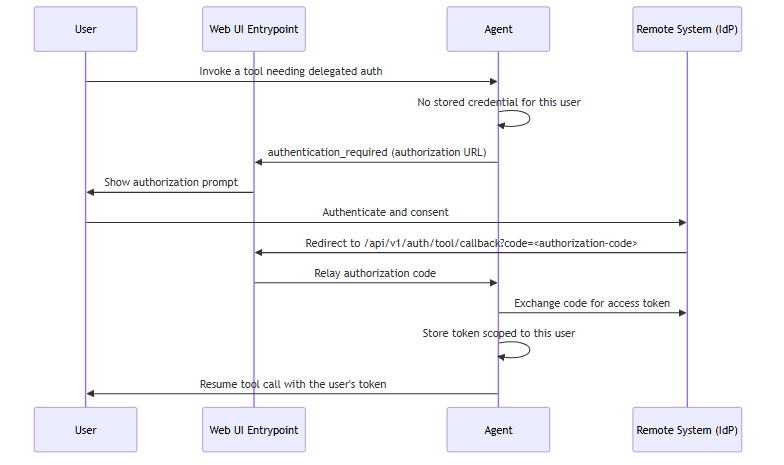
The stored token is isolated per user and per agent, encrypted at rest, and reused on subsequent calls. When it expires or the remote system reports that the granted scopes are insufficient, the agent clears it and prompts the user to authorize again.
Before You Begin
Delegated access has three prerequisites:
-
Single sign-on is enabled. The delegated credential is bound to the authenticated user, so the Entrypoint must perform OpenID Connect (OIDC) login. See Enabling Single Sign-On (SSO).
-
A database-backed session store is configured. Per-user credentials persist in the session store. With the in-memory store, credentials are lost on restart and are not shared across replicas — use
sqlpersistence in production (see Per-User Credential Storage and Time-to-Live). -
The Trust Manager is enabled. Delegation is safe only when agents can verify that a request genuinely came from the Entrypoint. See Enable the Trust Manager.
On the remote system, register an OAuth 2.0 client (or confirm the server supports dynamic client registration) and record its authorization and token endpoints, client ID, and client secret. Add the Entrypoint's callback URL — https://<your-dns-name>/api/v1/auth/tool/callback — to the client's list of allowed redirect URIs.
Enabling Per-User OAuth for a Remote MCP Tool
Delegated access is configured per tool, on the auth block of an MCP tool entry in an agent's configuration. Set the authentication type to oauth2; the runtime handles the prompt, callback, token exchange, and storage.
There are two ways to supply the OAuth details.
Discovery Mode
If the MCP server publishes OAuth 2.0 metadata (RFC 8414 / RFC 9728) and supports dynamic client registration (RFC 7591), omit the scheme and credential blocks entirely. The runtime discovers the endpoints from the server URL and registers a client at runtime:
# agent config
tools:
  - tool_type: "mcp"
    connection_params:
      type: "streamable-http"
      url: "https://mcp.example.com/mcp"
    auth:
      type: "oauth2"
      display_name: "Example"
If the server requires a pre-registered client, supply one through the environment variables in the Environment Variable Reference rather than inline.
Explicit Mode
When the server does not support discovery, declare the endpoints and client credentials directly:
# agent config
tools:
  - tool_type: "mcp"
    connection_params:
      type: "streamable-http"
      url: "https://mcp.example.com/mcp"
    auth:
      type: "oauth2"
      display_name: "Example"
      scheme:
        authorization_url: "https://mcp.example.com/oauth/authorize"
        token_url: "https://mcp.example.com/oauth/token"
        scopes: ["read", "write"]
        token_endpoint_auth_method: "client_secret_post"
      credential:
        client_id: "${EXAMPLE_CLIENT_ID}"
        client_secret: "${EXAMPLE_CLIENT_SECRET}"
The auth block accepts these keys:
| Key | Required | Purpose |
|---|---|---|
type
|
Yes | Set to oauth2 for delegated access. |
display_name
|
No | Name shown on the user's authorization prompt. Defaults to the server host. |
scheme.authorization_url
|
Explicit mode | The remote system's authorization endpoint. |
scheme.token_url
|
Explicit mode | The token endpoint. |
scheme.refresh_url
|
No | Refresh endpoint. Defaults to token_url. |
scheme.scopes
|
No | Scopes to request. |
scheme.token_endpoint_auth_method
|
No | client_secret_post, client_secret_basic, or none. |
scheme.audience
|
No | Non-standard audience parameter that some identity providers (for example, Auth0, Okta, or similar) require to issue a token the resource server accepts. |
scheme.resource
|
No | RFC 8707 resource indicator, sent on the authorization, token, and refresh requests so the identity provider binds a matching aud claim. The runtime discovers this value from the MCP server's RFC 9728 protected-resource metadata; set it only to override the discovered value. |
scheme.disable_pkce
|
No | Defaults to false. Leave Proof Key for Code Exchange (PKCE) on for MCP servers. |
credential.client_id
|
Explicit mode | OAuth client ID. |
credential.client_secret
|
No | OAuth client secret. |
credential_key
|
No | Storage slot name. Defaults to a value derived from the MCP server so tools on the same server share one credential. |
ca_cert_path
|
No | Certificate authority (CA) bundle for the runtime's calls to the OAuth endpoints. |
insecure_skip_verify
|
No | Disables TLS verification for those calls. Development only. |
An MCP server that requires authorization before listing its tools cannot be discovered live. For those servers, pre-declare the tool schemas with an inline manifest: list or an external manifest_file: on the tool entry. Servers that allow anonymous listing need neither.
Enable the Trust Manager
The Trust Manager is what makes delegation safe: each component publishes a signed trust card, and agents verify that an incoming task was signed by a legitimate Entrypoint before acting on the user's behalf. It is a deployment-wide capability, off by default. Enable it in the trust_manager block of every component's configuration:
# component runtime config
trust_manager:
  enabled: ${TRUST_MANAGER_ENABLED, false}
  verification_mode: "strict"
  card_publish_interval_seconds: 10
  card_expiration_days: 7
Set the TRUST_MANAGER_ENABLED environment variable to true so the interpolated enabled value resolves on every component — the Entrypoint and every agent. With the Trust Manager enabled, agents reject any task whose signature does not verify against a known trust card.
Trust cards are exchanged over a dedicated event broker topic, and the event broker's access control lists (ACLs) are load-bearing: a component's identity on the trust topic must match its event broker client username, which is what stops a compromised peer from publishing a forged card. Provision those ACLs when you deploy — see JWT Signing and Trust for the trust chain and topic conventions. This page does not restate them.
Per-User Credential Storage and Time-to-Live
Delegated credentials are stored in the session store, one slot per user per agent. The value is encrypted at rest with a key derived from the agent's identity, so credentials cannot be read from the database directly.
Persistence follows the session store's type. Configure a database-backed store so credentials survive restarts and are shared across replicas:
# agent config
session_service:
  type: "sql"
  database_url: "${AGENT_DATABASE_URL}"
With type: memory, credentials live only in the process and are lost on restart — acceptable for local testing, not for production.
Each stored credential carries a time-to-live (TTL) of 30 days, after which the agent treats it as absent and prompts the user to authorize again. The lifetime is fixed by the runtime and is not configured through an environment variable. When a user's access is revoked or a re-authorization replaces an existing credential, the old value is marked expired and no longer used.
A credential is refreshed when it is next used, not on a background schedule. A credential that Solace Agent Mesh holds can therefore still fail on first use, because the remote system rejects it before anything has cause to renew it. Plan for that on unattended work in particular: a stored credential being present is not the same as the remote system still honoring it.
The OAuth Callback and Redirect
The remote system returns the user to a fixed path on the Entrypoint: /api/v1/auth/tool/callback. This endpoint is intentionally unauthenticated — the browser arrives carrying only the authorization code and an opaque state value. The Entrypoint consumes the matching pending state and relays the code to the owning agent, which verifies the state before exchanging the code. Because the callback resolves its pending state against the shared gateway store, a login started against one Entrypoint replica can complete on another.
The full redirect URL is resolved in this order:
-
OAUTH_TOOL_REDIRECT_URI, if set — used verbatim. -
Otherwise
FRONTEND_REDIRECT_URIwith/api/v1/auth/tool/callbackappended. -
Otherwise a development default of
http://127.0.0.1:8800/api/v1/auth/tool/callback.
The development default uses the loopback IP 127.0.0.1 rather than localhost intentionally. Browsers can silently upgrade http://localhost to https:// through HTTP Strict Transport Security (HSTS) or an HTTPS-only mode, which breaks the plain-HTTP callback. A loopback IP is never upgraded.
In production, set one of the first two to your externally reachable HTTPS host. Real identity providers reject the loopback default. Whatever value resolves must exactly match a redirect URI registered on the OAuth client.
If you previously registered http://localhost:8800/api/v1/auth/tool/callback on a manually configured OAuth client, re-register it as http://127.0.0.1:8800/api/v1/auth/tool/callback to match the new default, or set OAUTH_TOOL_REDIRECT_URI to the value you registered. Clients created through Dynamic Client Registration re-register automatically and need no change.
Environment Variable Reference
The runtime reads these variables.
| Variable | Purpose |
|---|---|
TRUST_MANAGER_ENABLED
|
Resolves the trust_manager.enabled value. Set to true on every component. |
TOOL_OAUTH_CLIENT_ID
|
Static OAuth client ID used when the server does not support dynamic client registration. |
TOOL_OAUTH_CLIENT_SECRET
|
Static OAuth client secret paired with the client ID. |
TOOL_OAUTH_INITIAL_ACCESS_TOKEN
|
Initial access token presented during dynamic client registration, when the server requires one. |
OAUTH_TOOL_REDIRECT_URI
|
Explicit callback URL for delegated tool flows. Highest precedence. |
FRONTEND_REDIRECT_URI
|
Fallback base for the callback URL when OAUTH_TOOL_REDIRECT_URI is unset. |
MCP_CLIENT_ID
|
Legacy alias for TOOL_OAUTH_CLIENT_ID. Prefer the TOOL_OAUTH_ name. |
MCP_CLIENT_SECRET
|
Legacy alias for TOOL_OAUTH_CLIENT_SECRET. Prefer the TOOL_OAUTH_ name. |
Verify
Start the deployment with the Trust Manager enabled and confirm the components exchange trust cards — each agent logs that it received the Entrypoint's trust card at startup. Then sign in and invoke a delegated tool:
-
The first call surfaces an authorization prompt naming the remote system (the
display_name). -
Completing the login redirects the browser back and the tool call resumes automatically.
-
A second call from the same user runs without a prompt — the stored credential is reused.
-
Signing in as a different user prompts again, confirming credentials are isolated per user.
Troubleshooting
| Symptom | Cause | Fix |
|---|---|---|
| Authorization prompt never appears; the tool call fails outright | The MCP tool's auth.type is not oauth2, or no client ID is available and the server does not support dynamic registration |
Set auth.type: oauth2; supply TOOL_OAUTH_CLIENT_ID / TOOL_OAUTH_CLIENT_SECRET if discovery is unavailable |
| Login completes but the browser shows a redirect-mismatch error | The resolved redirect URL is not registered on the OAuth client | Register the exact /api/v1/auth/tool/callback URL, or set OAUTH_TOOL_REDIRECT_URI to a registered value |
Redirect lands on http://localhost:8800 in a deployed environment |
Neither OAUTH_TOOL_REDIRECT_URI nor FRONTEND_REDIRECT_URI is set, so the development default applies |
Set one of them to your externally reachable HTTPS host |
| Credentials are lost after every restart | The session store is type: memory |
Switch to type: sql with a database_url |
| Users are prompted to authorize on every call | No session_service block is configured, so credentials are never stored |
Add a session_service block; use type: sql in production |
| Agent rejects the task before the tool runs | The Trust Manager is enabled on some components but not others, so signature verification fails | Set TRUST_MANAGER_ENABLED=true on the Entrypoint and every agent |
| A private-CA OAuth endpoint cannot be reached, and it is a connector created in the UI | The connector-generated configuration cannot yet emit ca_cert_path / insecure_skip_verify |
Configure the tool in agent YAML directly and set ca_cert_path on the auth block |
What Next?
You have enabled per-user delegated access to remote tools. Most operators next add more remote systems — see MCP Connectors for the transports and authentication types agents support. To pin a private-CA certificate for the runtime's outbound calls, see Configuring TLS.