Best Practices for Designing an Event Mesh with DMR
This section explores some examples that show how to design an event mesh using Dynamic Message Routing (DMR). It also discusses Solace's recommendations for configuring certain aspects of your DMR network. Before you read these best practices, ensure that you also understand the DMR network core concepts described in DMR Terminology. Also make sure that you understand how subscription propagation works. For more information, see DMR Subscription Propagation and Data Forwarding.
Using DMR to Build an Event Mesh
The following example describes a complex problem: building an event mesh for a large global organization. This example may not be reflective of your organization. This doesn't mean that you don't need an event mesh, just that your event mesh might be much simpler to visualize, and you might not require much help getting started.
The process of building a DMR network can be broken down into five steps:
- Design your topic hierarchy and begin a catalog of available events.
- Define your clusters.
- Connect your clusters into an event mesh. This step defines the interactions between the clusters and their underlying applications.
- Consider how you want your clusters to grow.
- Manage data access for applications outside the event mesh.
Design the Topic Hierarchy
The main advantage of an event mesh is that it frees your data from siloed systems so that other systems can use it. To achieve this, you must define a topic hierarchy that allows publishers to properly describe the data they are creating without conflicts. Proper topics also allow administrative control of data. Along with a topic hierarchy that conforms with the Topic Architecture Best Practices, you also need a catalog of available data as described by the topics. This catalog allows consumers to subscribe to the data they would like to consume. To catalog and visualize event-related data, use the Solace Event Portal Catalog.
Define the Clusters
The first step to building a DMR network is to define what constitutes a cluster. The goal is to create homogeneous clusters. You can do this in several ways; a first approach is to consider the sites and lines of business (LoBs) of your organization.
Step 1:
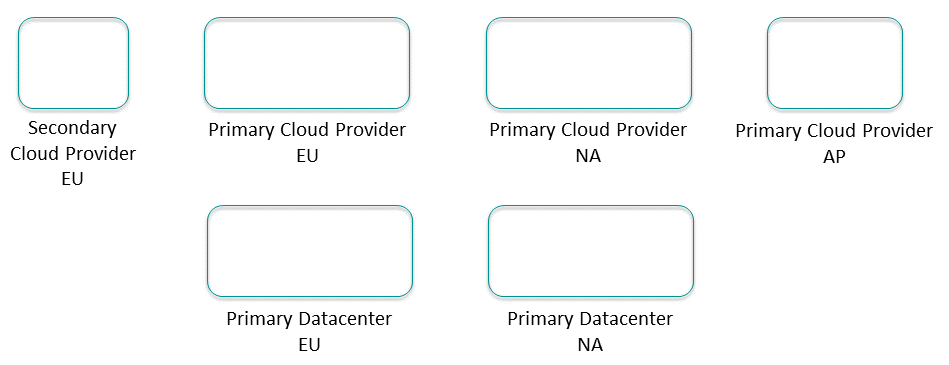
List all the data centers or cloud provider regions where applications run or will run. These are your sites.
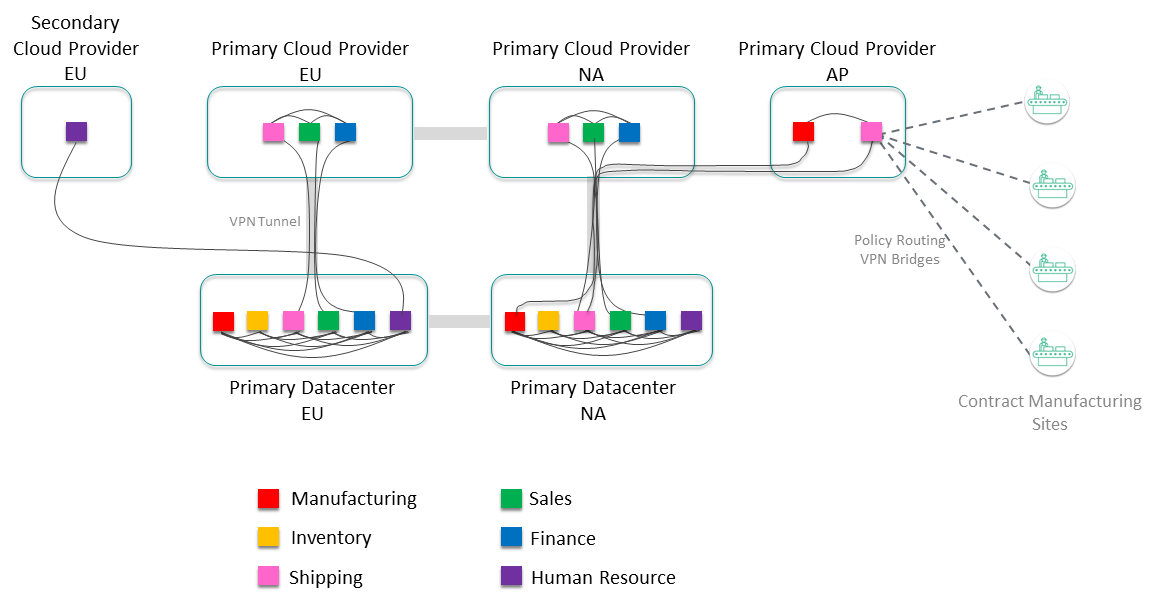
For example, in the following diagram, the primary locations are the Europe (EU) and North America (NA) data centers. Then also there is regional presence in primary and possible secondary cloud providers.
Step 2:
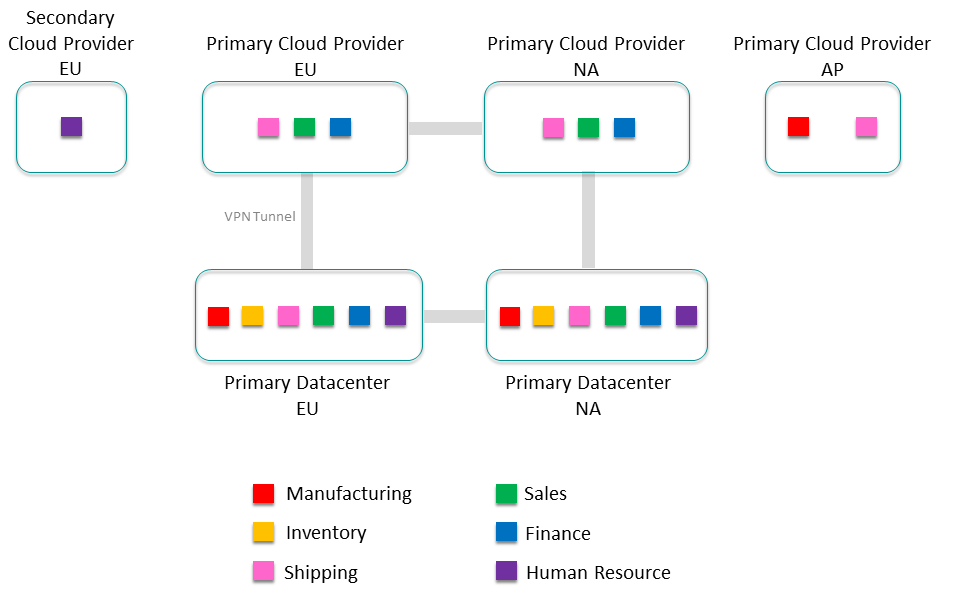
List all the foundational application domains, usually the lines of business (LoBs), within your organization. Keep this at a high level, not a specific application or application team, but along the lines of product groups or cost centers within your organization. For a product manufacturing company these lines of business might be: Manufacturing, Inventory, Shipping, Sales, Finance, and Human Resources. Place the lines of business into the regions where their applications run.

At this point you have a view of the number of core clusters in your event mesh by adding up all the LoBs in each site; in this case there are 10 clusters in Europe, nine clusters in North America, and two clusters in Asia.
Connect Clusters into an Event Mesh
Now that you know what your DMR clusters look like, you must decide how to connect them to each other.
Step 1:
If this is not a completely new deployment, you probably have physical infrastructure to consider, such as cloud-to-data-center connections with VPN tunnels and firewalls. Try to overlay the event mesh onto the existing infrastructure as much as possible:
Step 2:
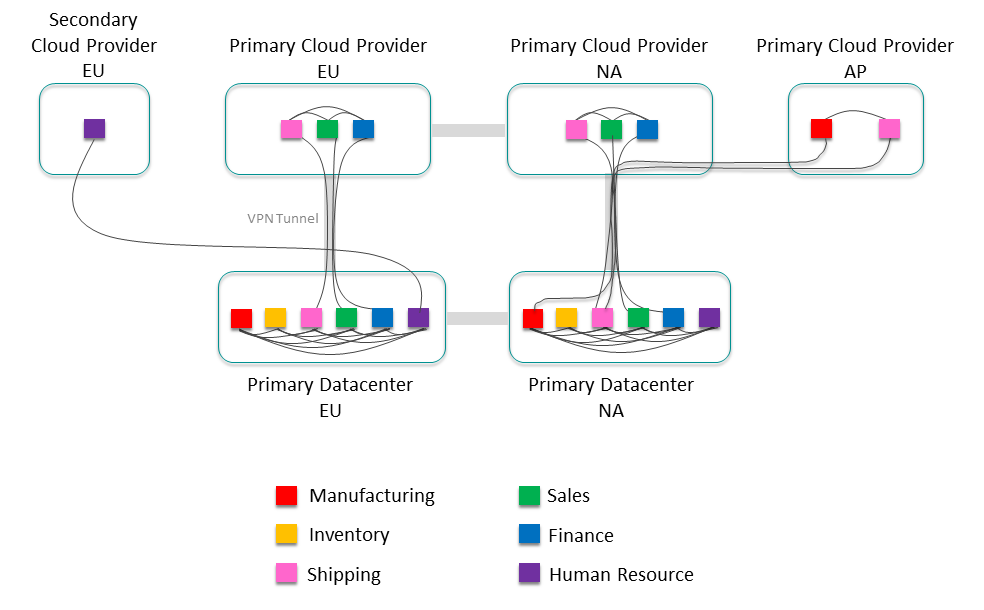
Now add external links between all the clusters that need to exchange data. Not all clusters exchange data with every other cluster at the start. You can construct the initial event mesh with just the known data exchange. Some clusters might not exchange data with any other cluster. As all the event mesh data becomes cataloged and available, the number of external links inevitably grows. Plan to evolve the event mesh as your organization grows.
Consider Cluster Growth
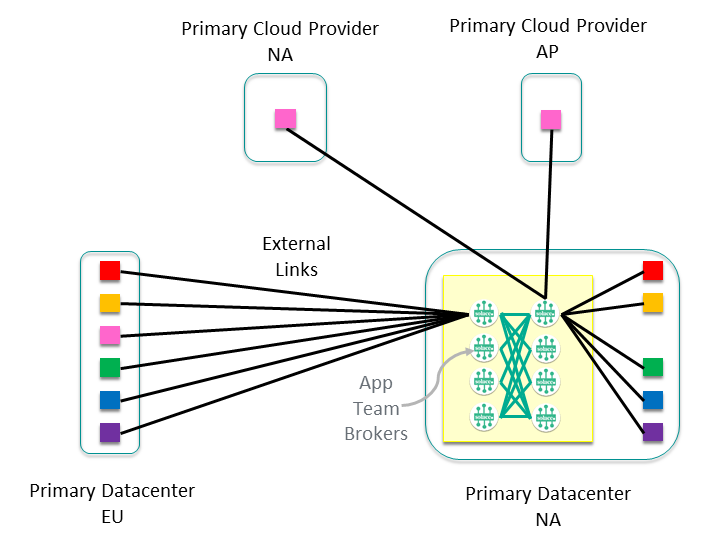
Now that the event mesh is laid out, let's look inside a cluster to determine how best to design it with growth in mind. For example, the Sales cluster in the North America Primary data center would look something like this:
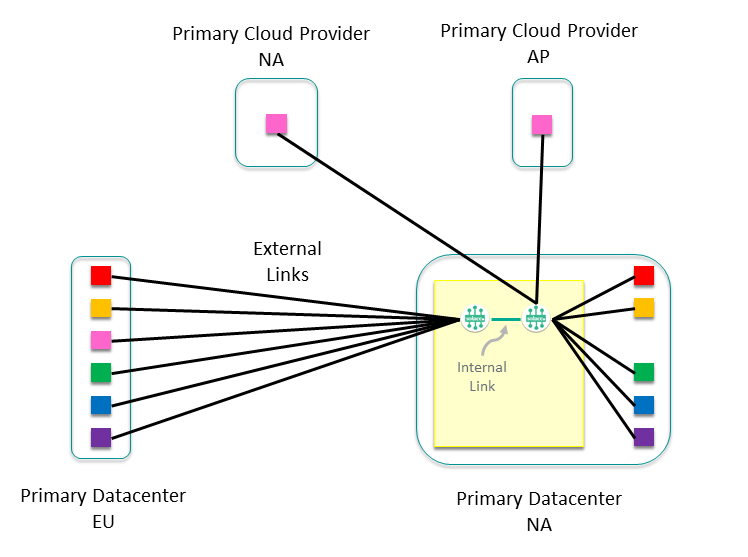
You can see external links to all the other clusters that it communicates with, as well as two internal nodes with the external links balanced across them. Depending on the number of external links and the expected growth of the cluster, you would normally have only one or two nodes to start with. From here, think about how you want the cluster to grow—a common approach is to give each application team or sub-domain their own node. This sub-divides the data exchanges and allows the intra-subdomain traffic to remain on a single event broker, allowing optimization of network usage, and making it easier to monitor traffic between application domains and sub-domains. This approach allows our cluster to grow to eight nodes dedicated to servicing Sales events within the North America data center.
Manage Data Access for Applications Outside the Event Mesh
Finally, consider other sites that require additional control, for example contract manufacturing sites. The information from these sites might be very important, but you don't want to allow full access to the event mesh. You can use static VPN bridges with administratively-assigned subscriptions to allow access to certain data for these sites, while still controlling interface to the event mesh.
Expand Clusters or Connect Clusters?
How do you decide when to use internal links to grow your existing clusters, and when to use external links to join clusters together?
For example, suppose you have three clusters (Cluster 1, Cluster 2, and Cluster 3), with external links between Cluster 1 / Cluster 2, and between Cluster 2 / Cluster 3. In this configuration, Cluster 1 can exchange events with Cluster 2, and Cluster 2 can exchange events with Cluster 3, but Cluster 1 cannot exchange events with Cluster 3.
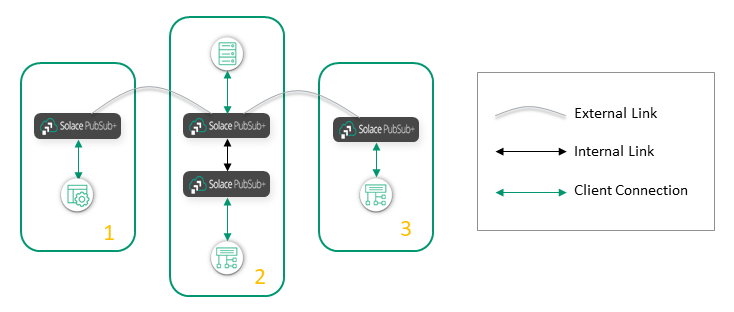
What is the best way to connect the nodes in Cluster 1 and Cluster 3? You can add an external link between Cluster 1 and Cluster 3:
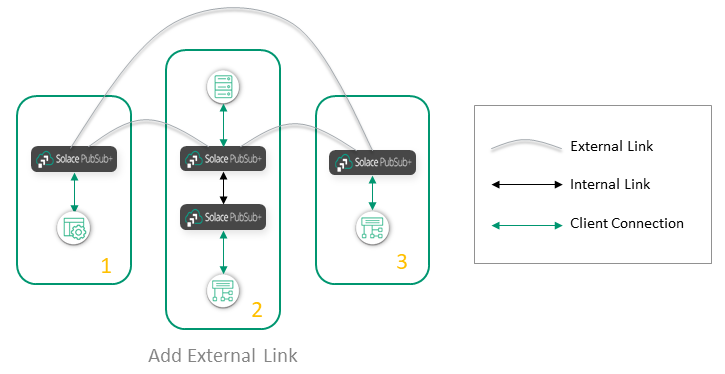
Or you can "stretch" Cluster 2 to include the nodes in Cluster 3:
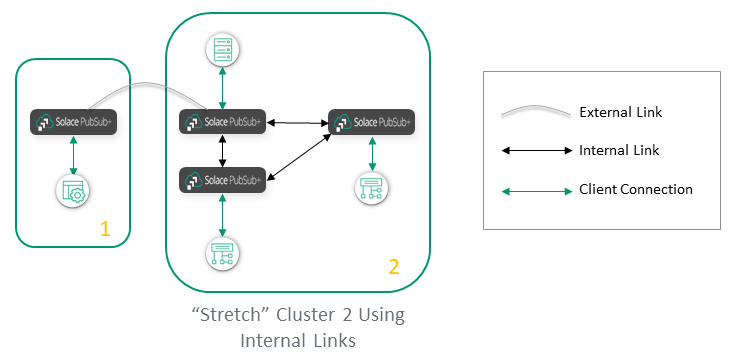
A general recommendation is to use internal links within a site, like a data center or a public cloud region, and use external links between sites. However, a few factors influence how you apply this general rule.
Use an external link in these situations:
- Sites are connected by low-bandwidth, high-cost, or high-latency links (for example, intercontinental links or links to remote locations). External links are best in this situation because if a message must be fanned out to several event brokers at the remote site, it is better to send it only once over an external link than to send it many times over internal links (once for each event broker at the remote site).
- Sending a message out of a domain or site has a financial cost. For example, if you are linking event brokers between cloud providers, each cloud provider often charges for any data leaving its cloud. In this case, you want the data to leave only once, over an external link, rather than once for each event broker in the other cloud provider.
- You want to build a hub-and-spoke topology, where event brokers on the spokes never exchange messages with event brokers on other spokes. External links connect the spoke clusters to the hub cluster.
However, if connectivity within a region is good and low-cost, we recommend that you group all the sites in the region into one big cluster, within the limit on the number of nodes. This approach is the simplest, and it provides the best connectivity because it removes the risk of gateway event brokers becoming a bottleneck.
How Disaster Recovery Affects the Event Mesh
As described here, disaster recovery (DR) works on a node-by-node basis. You must have a replicated node for each node you want to protect with DR. The replicated node must be in the same cluster as the primary node, and it must have a full mesh of internal links, as the normal rules require. In most cases, stretch the cluster to include the primary site and the DR site.
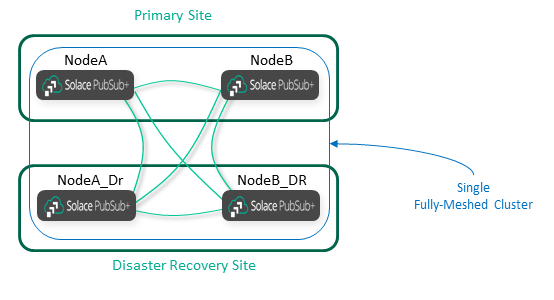
When you add external DMR links or VPN bridges, you must connect them to both the primary and DR sites, as shown in the following diagram:
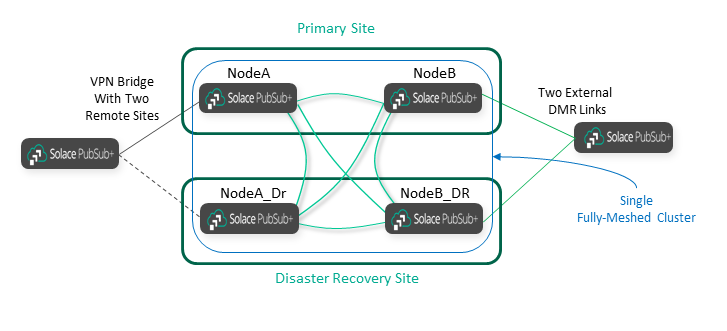
As you can see, adding DR (replication) affects the DMR architecture in three ways:
- DR doubles the number of internal DMR links inside the cluster that is being protected.
- DR requires stretch clusters across the Primary and DR sites.
- DR doubles the links that external clusters must have, because they must connect to both sites.
Securing the Event Mesh
The main goals for securing your event mesh are to allow only authorized people to view the data, and to prevent unauthorized people from viewing or manipulating the data. Since DMR links transit between the confines of secure data centers, they might be more vulnerable and selected for attack.
The straightforward solution to this problem is encrypting the data with TLS, along with using authentication (username and password or mutual authentication certificates). A more thorough solution is layers of defense.
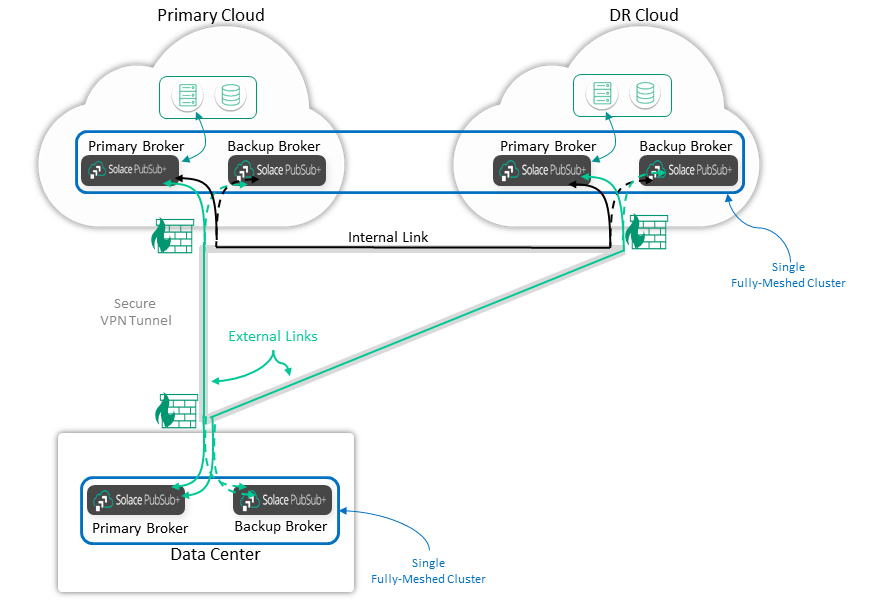
Between sites, we recommend using secure VPN tunnels with firewalls terminating either end. We recommend that you do not expose your event brokers directly on the public internet. Also, terminate the VPN onto a subnet of specially purposed termination devices, such as event brokers, and use that subnet as a demilitarized zone (DMZ). Then abstract the data processing and data storage applications into another subnet that has no internet access.
We recommend that you establish connections from the most secure location, such as a data center, to a site such as a DMZ subnet. Do not open data center firewall rules to allow connections.
All of these principles are shown in the following diagram. In this example, the data center event brokers connect to the cloud event brokers via secure VPN tunnels. Use cloud-provided mechanisms for inter-cloud connections. Place applications in private subnets that are not exposed to the public internet or even to the VPN tunnels.
Finally, high availability and replication add several connections, which can complicate certificate management if TLS is used. We recommend that the Primary and Backup event brokers use the same server certificate, with the common name or Subject Alternative Name covering both devices. Do not try to redirect the DNS name of the Primary site to the replication site; instead, use host lists for these different sites. That is, the Primary and Backup event brokers at the Primary site, and the Primary and Backup event brokers at the replication site, can use different server certificates, and a certificate does not need to cover both sites. We recommend a different DNS name and certificate for the replication site in case the certificate of the Primary site is compromised.
Getting Help
Building a DMR network can quickly become a complex architectural exercise. If you're building a DMR network with more than a couple of clusters, or you have specific networking or security constraints, we recommend you contact Solace for assistance.